
Outfit customizers are digital tools that help you create and experiment with personalized clothing combinations. Generally, they are designed to help you put outfits together online, either using snapshots of your existing wardrobe or digital assets.
These websites or apps often include AI outfit styler technology that suggests looks based on your body type, style, and weather/occasion. They also offer features to personalize your wardrobe based on your preferred colors, specific events, weather, and calendar dates. Some come with a virtual try-on for seeing how items look together. Others offer planning features for scheduling outfits for weeks and tracking everything you own.
With many options, each with its own approach, how do you choose the best sites to put outfits together? This guide breaks down the top outfit customizers, highlighting their standout features, what you can realistically expect, and their key limitations.
Best Outfit Customizers for Curing Outfits and Organizing your Wardrobe
Fits
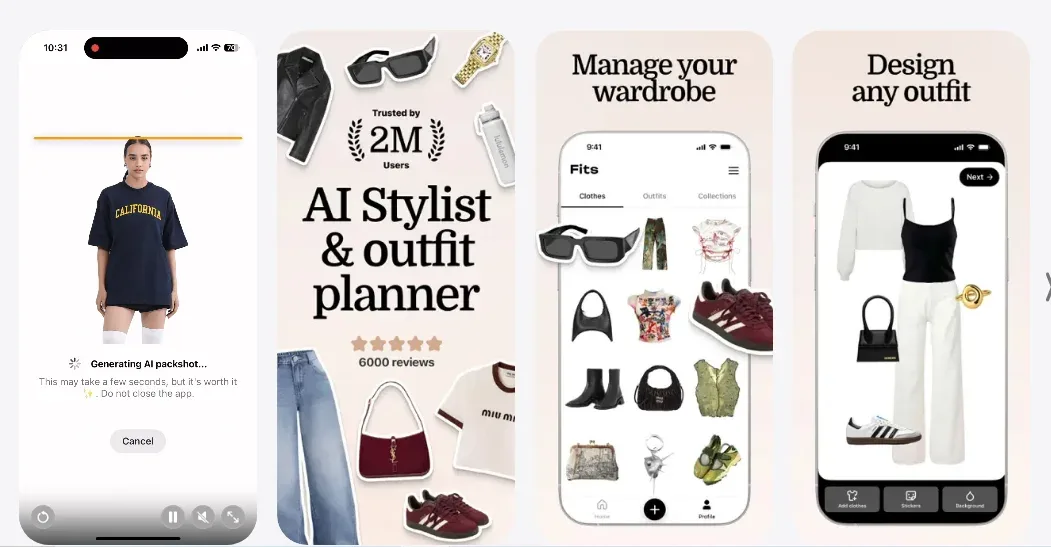
Fits is one of the best websites to put clothes together. Specifically, it lets you catalog clothing items by adding photos with automatic background removal. You can also split clothes by categories, colors, seasons, brands, and add custom tags. There’s also a “dressing room” where you can swipe clothes on a mannequin until you put together an outfit that works for you. Fits is an AI stylist and virtual try-on that provides outfit recommendations based on a few questions. Plus, you can plan your outfits by calendar, track how you wear, and optimize your wardrobe. Fits also lets you discover outfits from other users and even share your “outfit of the day” stories in the community.
Pros
- Background removal is automatic when creating collages.
- The free tier lets you add unlimited clothes and remove backgrounds from each one.
- There’s an app for Android and IOS.
- You can create wishlists and packlists alongside shopping directly
Cons
- The platform works entirely on mobile.
- Advanced AI features require a subscription.
- You’ll still encounter issues such as outfit templates freezing or disappearing when editing.
- The community isn’t a full “For You Page,” so it isn't personalized to your needs.
Whering
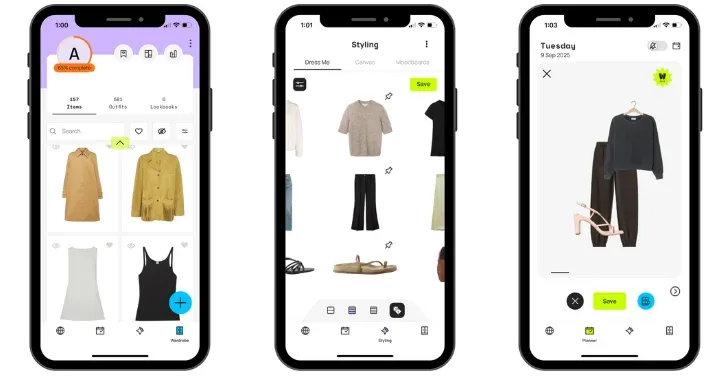
Whering lets you upload your own clothes and add generic items from the database to fill gaps. Its flagship feature is the "Digital Wardrobe Rental," which allows users to virtually lend and borrow digital versions of their clothes to style them, promoting sustainable creativity.
The idea is to experiment with “new” items virtually without actually buying them. For instance, you could rent a blouse photo and see how it works with your current wardrobe.
The database also has over 20 million items. Additionally, background from your photos is removed automatically. There’s a “Dress Me” feature to put together the most unexpected outfit combinations randomly. I also find the W-Pick AI Generator more intuitive for seeing suggestions based on your personal style and wardrobe. And when you don’t need additional help, you can manually drag and drop items on a canvas to create your own looks.
Pros
- A forward-thinking app to customize outfits in diverse ways.
- You also have a calendar feature for scheduling outfits and tracking usage.
- The entire app is designed to offer a game-like experience, which keeps things simple.
- You can also follow your friends, browse their public wardrobes, and style outfits for each other.
- Also has a sustainability hub that links to local repair services in the U.K.
Cons
- You need to upload your entire physical wardrobe, which is time-consuming
- The premium features can feel underwhelming compared to other outfit customizers.
Shuffles (Pinterest)
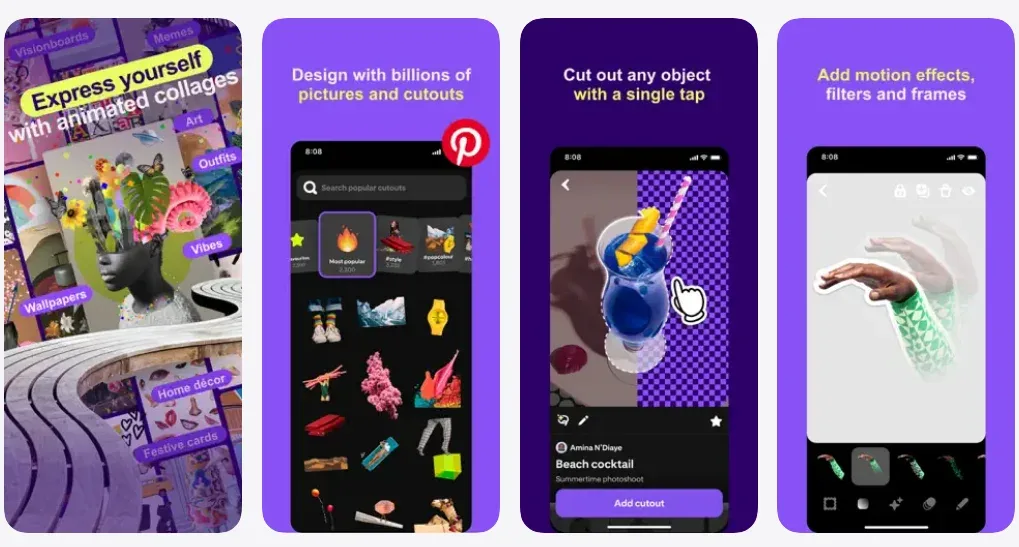
Shuffles is a community platform and outfit maker that lets you create a fashion moodboard and outfits using real products from various brands. It isn’t designed to manage your existing wardrobe. Instead, this outfit organizer lets you choose from millions of product images to create your outfit catalogue, including a wishlist. If you’re interested in doing more with your curations, you can purchase your design, follow other creators, and participate in fun styling challenges. That said, Shuffles is better suited to expressing an aesthetic vision and discovering new products linked from Pinterest.
Pros
- Free-from, drag and drop for creating outfits or general moodboards
- You can easily remove the background from images.
- There's also apps for both Android and iOS users.
- You can also view outfit details, item prices, and make a purchase directly.
Cons
- There’s no option to upload photos from your actual wardrobe.
- Limited options for masculine clothing.
- Not suitable for people who want guidance on their styling choices.
Lookastic
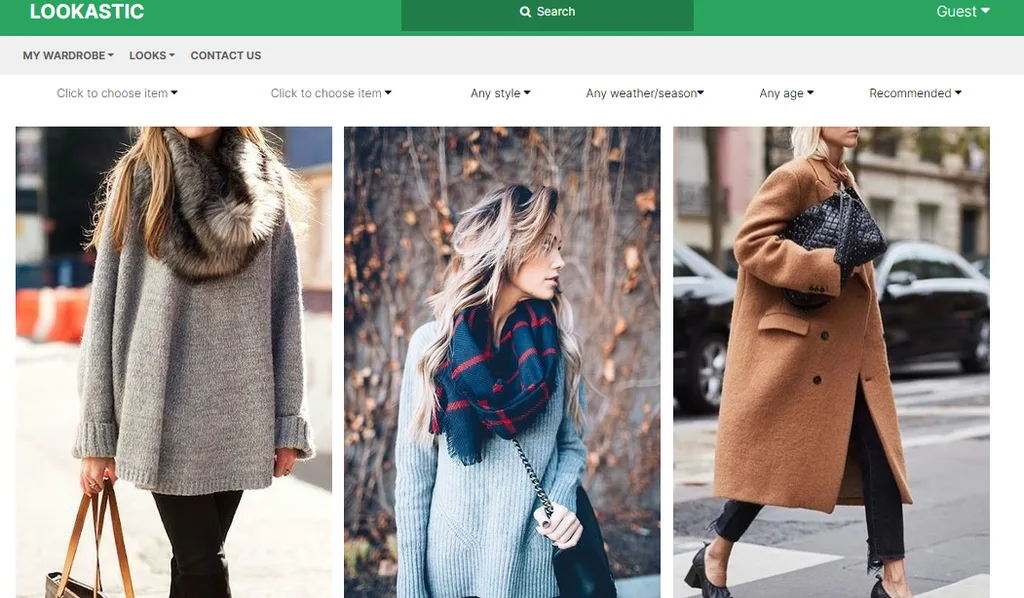
Lookastic functions as an outfit search engine, distinct from other outfit customizers. On this platform, you can pick from digital photos already on the platform, and you’ll receive suggestions on how those ideas work. If your wardrobe is filled with regular clothes, it’s easier to generate outfits based on those existing items. However, if you have more unique or one-of-a-kind styled clothes, Lookastic might not be the best choice. That said, I love it because you can browse hundreds of clothing items and identify pieces you don’t already have. The outfit, in particular, draws inspiration from celebrity photos and social media posts. Therefore, if you love trendy designs, it’s a fantastic option. And you can even shop the pieces you coordinate directly.
Pros
- Outfit search engine app with crowd-sourced suggestions directly from socials and celebrity pages.
- Access robust style inspiration, especially by seeing how others style similar pieces.
- If you struggle to match your clothes, you’ll visually benefit from it.
Cons
- There are no additional features for uploading pictures of your own clothes or managing your personal wardrobe.
- The platform is primarily about encouraging you to shop, rather than managing your wardrobe.
- The website and app’s interface are outdated.
Stylebook
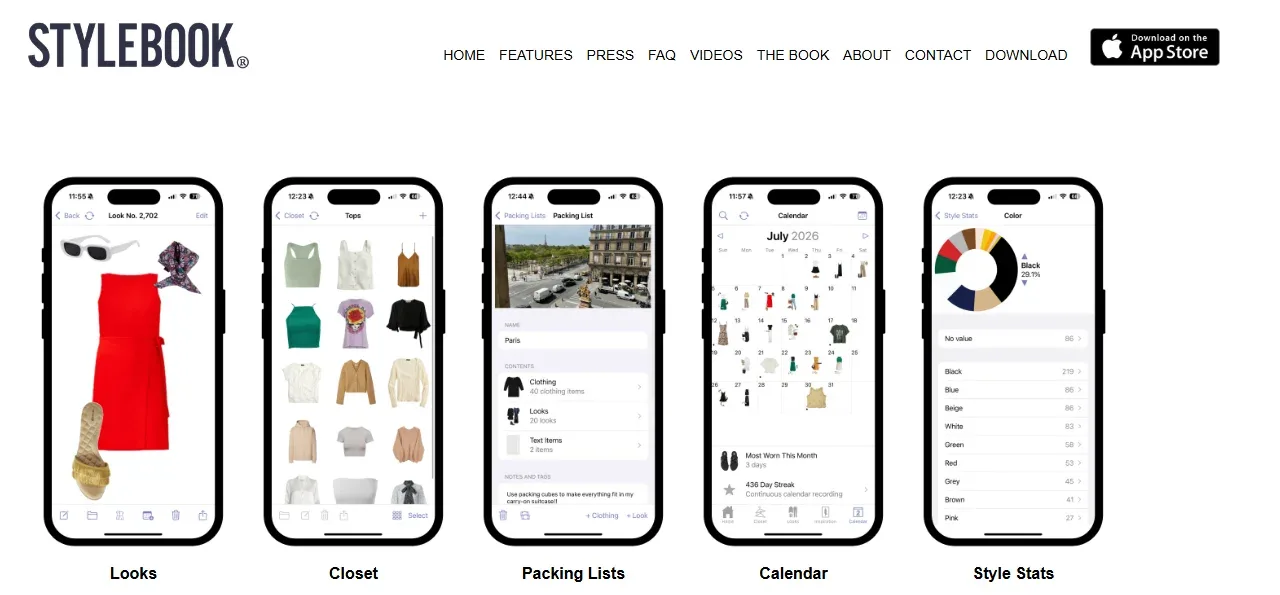
Stylebook is a robust virtual closet manager with advanced features, including the Style Stats page, where you can view most-worn items, total closet value, color usage, and more. You also have a virtual closet, which requires uploading snapshots of your clothes, shoes, and accessories. This would be stored in different customizable categories.
You also have Packing lists for travel and a comprehensive calendar to log your daily looks. Additionally, there are editing tools for precisely clipping photos from online stores and blogs to build a mood board or wishlist. I especially love how you can preview outfits on a free-form canvas until everything is set, then switch to a magazine-style preview that can be saved.
Stylebook is data-driven and is most useful if you cover the initial process of photographing and improving every item.
Pros
- Dedicated features to combine clothes and even maximize the use of neglected items.
- A great fit for anyone looking to build a capsule wardrobe.
- You can add notes to items you like for refashioning and outfit combinations.
Cons
- It’s an iOS app which means there’s no Android version.
- The outfit customizer struggles with specific color values and requires manual editing to enter the correct values.
- Editing the photos you add can be very tiring.
- Data does not automatically sync across your iPhone and iPad.
Acloset
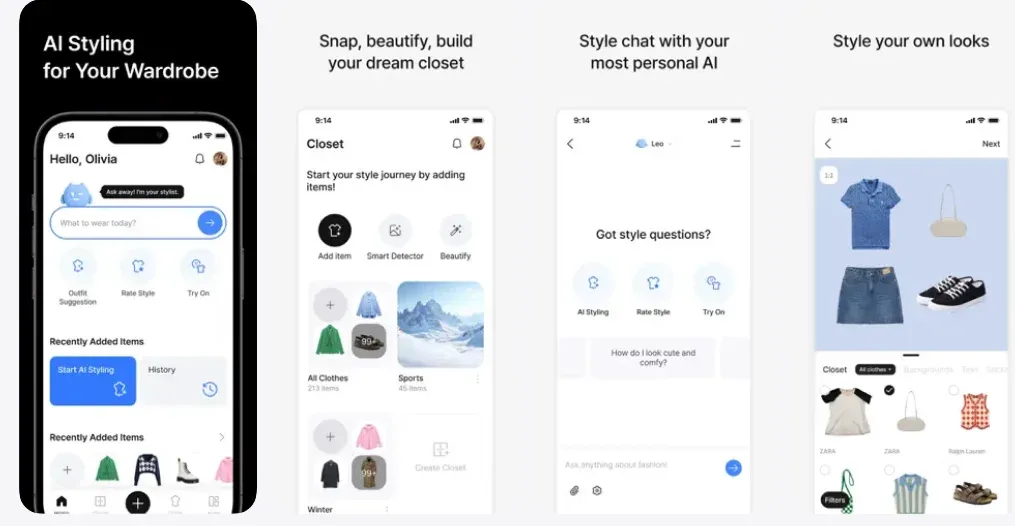
Acloset is also one of the best sites to put outfits together. Here, you can upload photos of your clothes. Your photos don’t have to be perfect as well. You can create, save, and plan your outfits based on the weather and occasion. AI technology removes the background, transforms images, and tags items based on details such as color, material, and category.
There’s also Wardrobe Analytics for usage frequency and cost-per-wear statistics. Acloset also includes an AI stylist you can ask for personalized analysis, daily outfit suggestions, and more. Some users say Acloset is more intuitive than Stylebook. Plus, you can also explore wardrobes from style leaders and join a community of over 4 million users.
Pros
- You can use it for free for up to 100 items.
- It works on both Android and iOS.
- Fast and easy to set up.
Cons
- Without upgrading, you’ll be greeted with aggressive ads.
- The best features, such as AI suggestions and trend reports, are locked behind a premium subscription.
Pureple
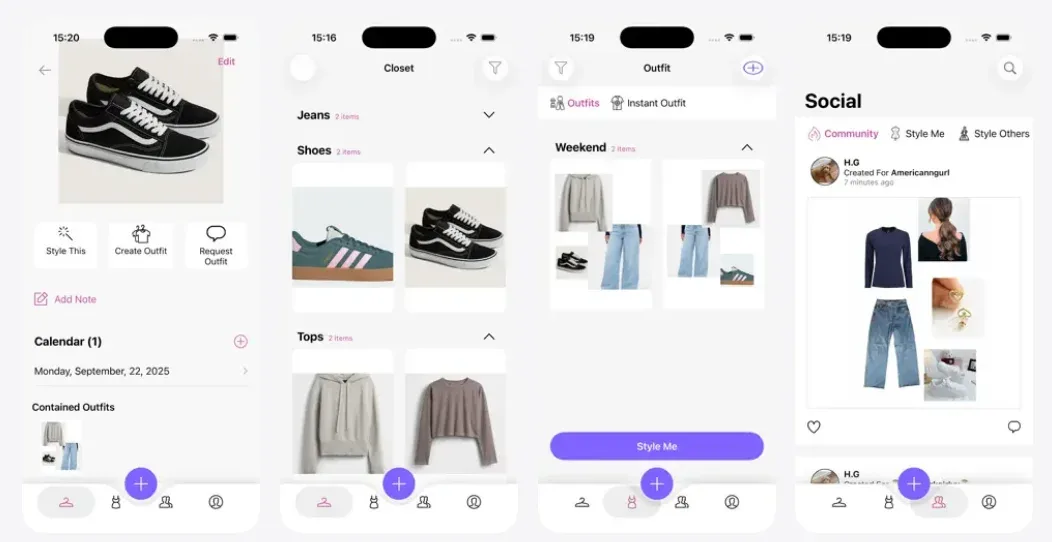
Another great outfit customizer is the Pureple app. This app lets you catalog your physical clothes either by taking pictures or importing images from your online retailers. Then the app analyzes your clothes and suggests fresh outfit combinations based on your style, events, and color preferences.
You can also plan your outfits and create packing lists. What you’ll love most about it is the style community where you can share your outfits, get inspiration, and ask others for styling advice. Plus, the app is designed to work with a range of men’s and women’s fashion styles and demographics.
Pros
- The “Style Me” feature generates the most unique outfit ideas, making the app a favorite among users.
- It’s also available for Android and IOS smartphones.
- Although the AI feature is fantastic at outfit suggestions, you’ll love the community for real insights from other people.
- You’ll find its closet and planner very intuitive.
- The Pro version is also backed by a cloud that updates no matter how you use the app.
Cons
- There are occasional issues, such as photos not loading or AI outfits not fitting well.
- You still have to go through the manual process of upgrading your wardrobe.
- Weather-based planning requires a subscription, which is about $99.99 for full access.
- When on the free version, you’ll deal with intrusive ads.
Indyx
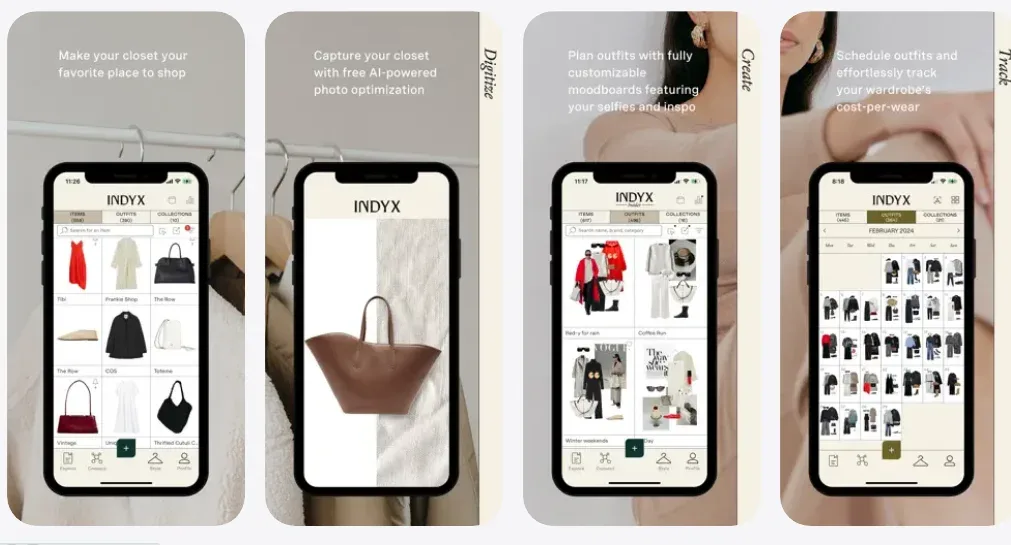
Indyx is also one of the best at putting outfits together online. This outfit styler website includes mood boards to try out outfits, catalogue your existing wardrobe, and more. You’ll love its background removal tool. And Indyx’s standout feature is the chances to get 1:1 human support for curation, styling, and even reselling items you no longer need.
For an additional $150, a human stylist from Indyx can style your wardrobe. You can also pay for the “Catalog” service, where a professional archivist would come to your home and digitize your entire wardrobe.
There’s also the opportunity to scroll through friends' or strangers' wardrobes for inspiration and more. You’ll especially love the chance to add unlimited outfits and plan packing lists alongside other collections. It also integrates with your calendar to track how you use your clothes.
Pros
- Indyx is free to download on both Android and IOS>
- Its one of the best outfit customizers that lets you customize your wardrobe and receive outfit suggestions from friends.
- Opportunities to add unlimited items and outfits on the free plan.
- Access to trusted human stylists versus apps that offer only AI.
Cons
- Uploading your wardrobe is still manual, but you can pay to have it done for you.
- Not suitable for those looking for a more affordable option or an AI-powered outfit stylist.
Introducing MakeOutfit
MakeOutfit is also one of the best outfit customizers to put clothes together online. Specifically, the parent website offers access to pre-organized custom outfit collections. This functions like a dedicated curator’s feed for your moodboards and wishlists.
The true innovation is its upcoming app, which consolidates multiple styling needs into a single platform. The MakeOutfit app will feature virtual try-on technology, allowing you to see how complete outfits look on you. You’ll also love the outfit customizer for mixing and matching complete outfits and accessories before purchasing. This also makes it one of the best sites for online shopping.
Plus, there would be features to create collage-style photos of your outfit curations and save them. MakeOutfit also uses AI to provide styling recommendations based on the weather, events, and more.
Wrapping Up
Not all outfit customizers are created equal. However, your choice depends on your goals for styling and managing your wardrobe. When you want to master your current closet, choose apps like Stylebook or ACloset.
For shopping inspiration and answering “what goes with this?”: choose MakeOutfit website or Lookastic. Shuffles by Pinterest is my favorite social and creative moodboard. However, you’ll get more body-aware personalized shopping with Fits. Plus, Wherings helps you find repairers for your clothes in the U.K. Above all else, the MakeOutfit app represents the next wave.
It aims to bridge the gap between curated discovery, AI styling, and virtual try-on in a single platform. By understanding the unique specialty of each platform, you can move beyond the clutter and select the digital tool that will genuinely help you dress with more confidence, creativity, and intention. Whether you're building from what you own or dreaming up what's next, your perfect outfit assistant is out there