Virtual Try-On: See Outfits on You Before You Shop
MakeOutfit's AI virtual try-on lets you see how clothes look on you, with no fitting room and no guesswork. Pick a garment, choose a model or upload your own photo, and watch AI place the look on you in a few minutes. Love what you see? Shop each piece directly from the retailer. Free to use: just create a quick account to start trying on.
Tired of buying clothes online that don't look right when they arrive? Virtual try-on shows you the outfit on a model (or on you) first, so you can shop with confidence and skip the returns.
How Virtual Try-On Works
1. Create your account. Sign up in seconds. It's quick, simple, and free to get started.
2. Choose a garment. Pick any item straight from the community feed or from a product page.
3. Click "Try" and pick a preset. You'll see a range of presets. Choose the one that fits the look you're going for.
4. Add your model. Upload your own photo or select one of our existing models to try the look on.
5. Click "Generate." Our AI places the look on your chosen model in a few minutes, then shop each piece directly from the retailer.
Already have an account? Log in to start trying on.
Feature Unavailable
Virtual Try-On is not available in Illinois.
Virtual Try-On: See Outfits on You
Pick a look, choose a scene preset, then upload your photo or select a model. Our AI places the outfit on you in a few minutes.
Selected Outfit
Vintage Christmas Snowflake Boots & Plush Tights Outfit
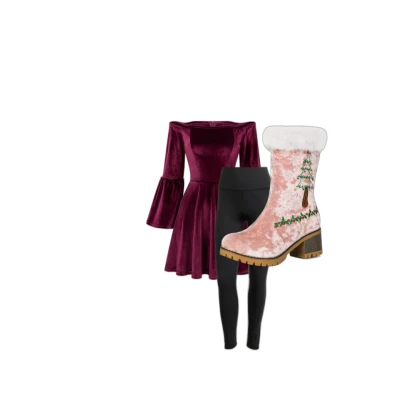
Sizes (optional) More options for a precise fit Optional
Choose the size you would wear for each piece, or leave it at No size.
Size
Try-ons of this outfit by other members
Try-On Presets
Try on Yourself
Choose your model
or drag & drop a photo here
Keep photos modest and clothed. Details
Please keep it modest: use a clear, clothed photo. If a generated image may contain adult or explicit content, we automatically stop that try-on so no such image is created.
Choose a Model
No models match these filters.
Create a try-on first. Then you can turn it into a video.
How to take a good photo
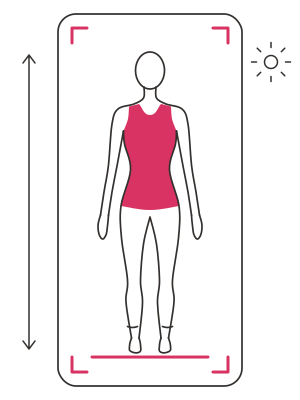
- Stand straight and face the camera, with your whole body in the picture from head to toes.
- Keep your arms relaxed, a little away from your body.
- Wear fitted clothes, so your shape shows.
- Use even light from the front.
- A plain background gives the best result. If yours is busy, the optional Remove background can help.
- Ask someone to take it, or rest the phone at chest height. Avoid mirror photos.
- Just you in the picture. Keep it modest and clothed.
Your photo
Busy background? Removing it often gives a cleaner try-on. This is optional.